Most guest Wi-Fi networks run on one of two access models. Guests either connect for free, or they pay for the connection. The choice affects more than the login page. It decides who covers the cost of bandwidth and equipment, how the network earns its keep, and what guests expect from the connection once they are online.
There is no default answer. A cafe, a stadium, a wireless ISP and a city hotspot network all have different reasons to run Wi-Fi, and the right model depends on those reasons. This article compares free and paid Wi-Fi, explains where each one fits, and looks at hybrid setups that use both.
What is free Wi-Fi?
From the guest’s side, free Wi-Fi means connecting without paying for access. From the operator’s side, it is still a cost: bandwidth, access points, maintenance and support all have to be paid for. The difference is that the cost is covered by something other than the user.
Free does not always mean open. Many free networks ask guests to pass through a captive portal first. Guests may need to accept terms of use, enter a phone number or email address, or confirm a one-time code. Operators use this step to meet local requirements, limit abuse and, where guests agree, collect contact details for marketing.
Businesses offer free access for different reasons:
- Customer experience. In cafes, restaurants and hotels, guests expect Wi-Fi as part of the service;
- Longer and repeat visits. A mall or retail space can give visitors a reason to stay longer and come back;
- Guest engagement. A portal page and optional sign-up give the business a direct channel to its visitors;
- Public access. Municipalities and public bodies fund free Wi-Fi as a service to citizens.
The return on free Wi-Fi is usually indirect. It shows up in longer visits, higher satisfaction, a growing contact list or advertising income, rather than in a Wi-Fi line on the revenue report.
What is paid Wi-Fi?
With paid Wi-Fi, the user pays the operator for connectivity. In practice, operators combine a few common pricing structures:
- Time-based access. A plan for an hour, a day, a week or a month;
- Data-based access. A plan with a fixed amount of traffic (for example, a 10 GB package);
- Pay per session. A single purchase that covers one visit or one connection period;
- Prepaid vouchers. The user buys a code in advance (in a shop, at reception or from a local seller) and redeems it on the login page;
- Subscriptions. Recurring access, common for ISPs and residential or community networks.
Users usually buy access on the captive portal. They pick a plan, pay through an online payment method, and get connected. In cash-based markets, vouchers sold through physical sales points are often more practical than card payments.
The operator controls what each purchase includes: speed, data volume, validity period, and how many devices can use the same plan. These limits are what turn connectivity into a product with clear prices and tiers.
Here is what the guest actually does in each case.
Paid Wi-Fi vs free Wi-Fi: key differences
Neither model is better across the board. The table compares how they behave on the points that usually drive the decision.
When should you offer free Wi-Fi?
Free Wi-Fi makes sense when connectivity supports a business that earns money in another way.
- Cafes and restaurants. Wi-Fi is part of the visit. Charging for it adds friction at the table for a small amount of revenue;
- Hotels. Many guests see Wi-Fi as a basic part of the stay, like other in-room amenities;
- Shopping malls and retail. Free access gives visitors a reason to stay and gives the venue a channel for offers;
- Public spaces. Free connectivity supports access to services, tourism and city life, usually funded by a public body or a sponsor;
- Events. When Wi-Fi is part of the ticket or the exhibitor package, charging attendees again rarely makes sense.
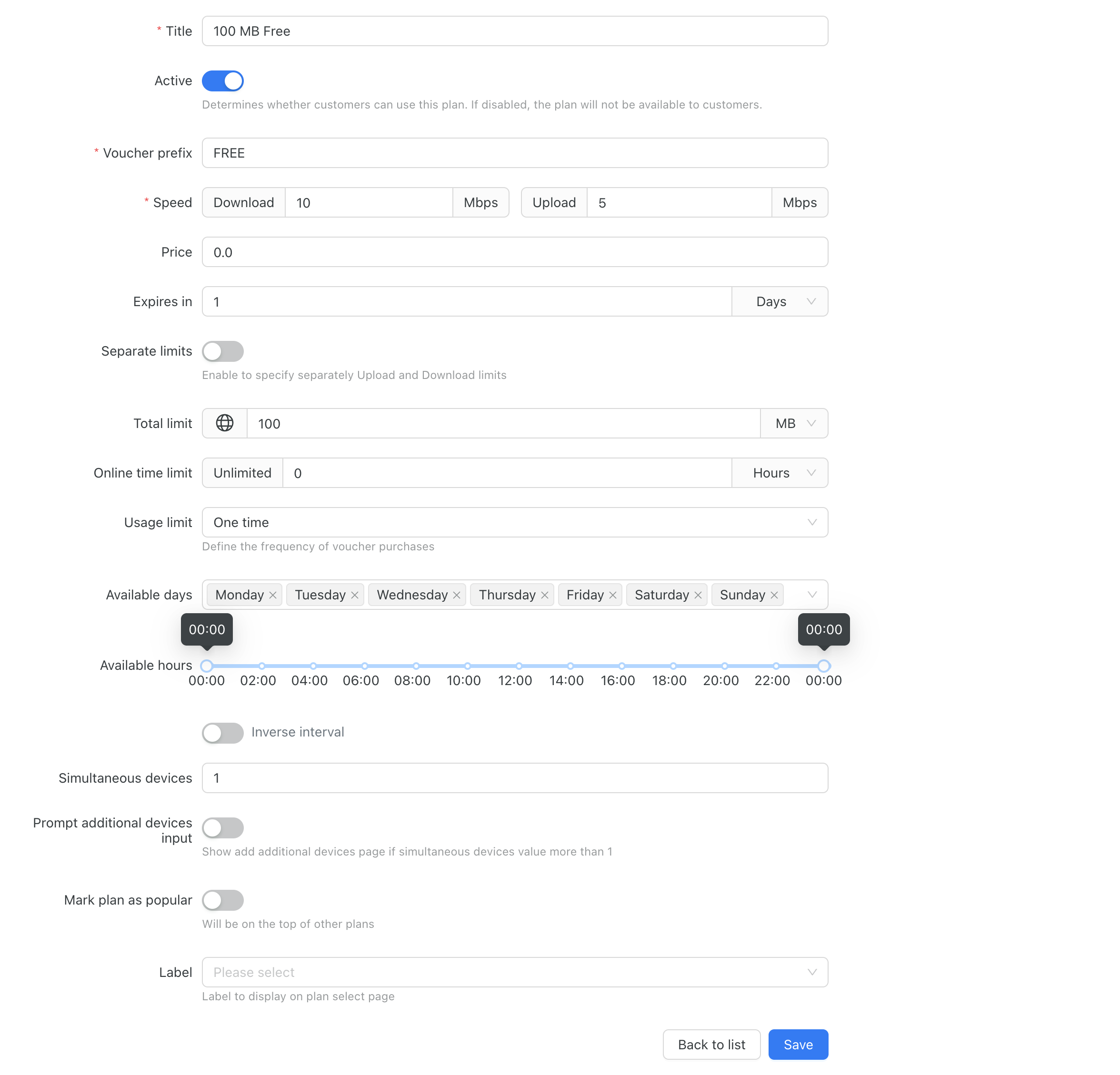
Free access still needs control. In Powerlynx, a free plan is a data plan with a price of 0, so guests are not sent to a payment page. The plan can still have speed, data and time limits, a validity period, a limit on simultaneous devices, and a usage limit (for example, once per day). This keeps free access sustainable on a shared connection.
The login step is configurable too. Guests can sign in with a phone number (optionally confirmed with an SMS code), or through a guest login that does not require a phone number and can be protected with a PIN. You can show a terms and conditions checkbox and collect the guest details you need, such as name, email or custom fields. If you need to decide who gets online, access control rules can accept, hold for approval or reject users based on phone number or device information.
Free Wi-Fi can also generate income through Wi-Fi advertising. Powerlynx can show an image or video ad before the guest gets online, schedule campaigns by date and time of day, and target them by location, splash page or data plan. Venues can sell these placements to partners or use them for their own promotions. The guide on how to monetize free Wi-Fi with advertising covers this in more detail.
When should you offer paid Wi-Fi?
Paid Wi-Fi fits when connectivity itself is the product, or when the network is too expensive to give away.
- ISPs and WISPs. Selling prepaid internet access is the business. Plans with clear limits and prices replace manual account management;
- Public Wi-Fi operators. Hotspot networks in towns, transport hubs or markets need direct revenue to cover backhaul and equipment;
- Community Wi-Fi. In many cash-based markets, small vouchers sold through local shops are the most practical way to pay for access;
- Events and temporary venues. Festivals and conferences can sell access for a set time or data amount;
- Long stays. Locations where visitors need reliable connectivity for hours or days (for example, campuses or accommodation without included Wi-Fi) can sell day or week plans.
In Powerlynx, paid access is built on data plans. Each plan has a price and can include download and upload speed, data limits, validity, online time, simultaneous devices, and the days or hours when it can be bought. Guests choose a plan on the captive portal and pay through an integrated payment gateway. Supported gateways include Stripe, PayPal, PayFast, Netcash, DPO Pay, MTN MoMo, Paystack, Xendit, Safaricom M-PESA, Vodacom M-PESA, Selcom and M-PAiSA, plus voucher-based payments such as 1Voucher, FNB Voucher and OTT Voucher. Availability depends on the operator’s country. For African markets, see the overview of payment gateways for guest Wi-Fi.
Paid Wi-Fi vouchers cover cash sales. A voucher inherits the limits of its data plan. Operators can generate voucher batches, set their validity, limit them to one location or allow them everywhere, and export them as PDF (with custom templates) or CSV for printing and distribution. Guests redeem the code on the captive portal. The article on launching a paid Wi-Fi voucher business walks through the setup.
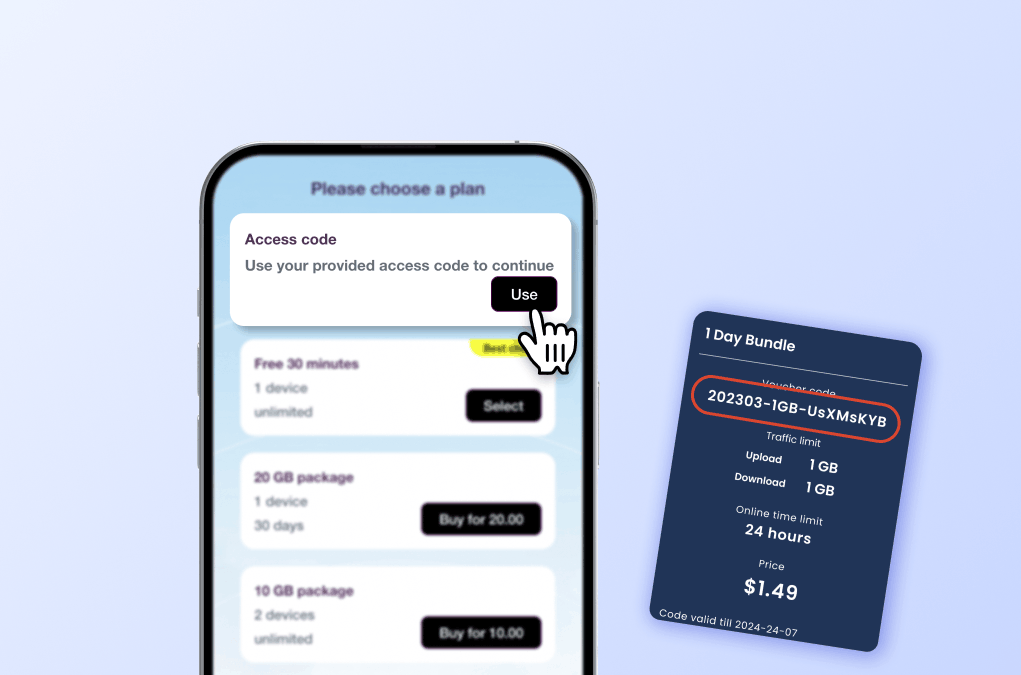
For wider distribution, the Reseller Portal lets local partners buy voucher batches at wholesale prices from a prepaid balance. Resellers can sell vouchers as printed PDFs or send codes by SMS, and they only see the plans and locations assigned to them. The operator is paid before the vouchers are generated.
Can you combine free Wi-Fi and paid Wi-Fi?
Yes, and many operators do.
Common hybrid setups include:
- Free basic access with a paid upgrade for higher speed or more data;
- A short free session (for example, 30 minutes or 100 MB) with paid plans for longer use;
- Free access supported by advertising, with paid plans for guests who need more;
- Free access for one group of users and paid access for others;
- Free Wi-Fi at some locations and paid Wi-Fi at others.
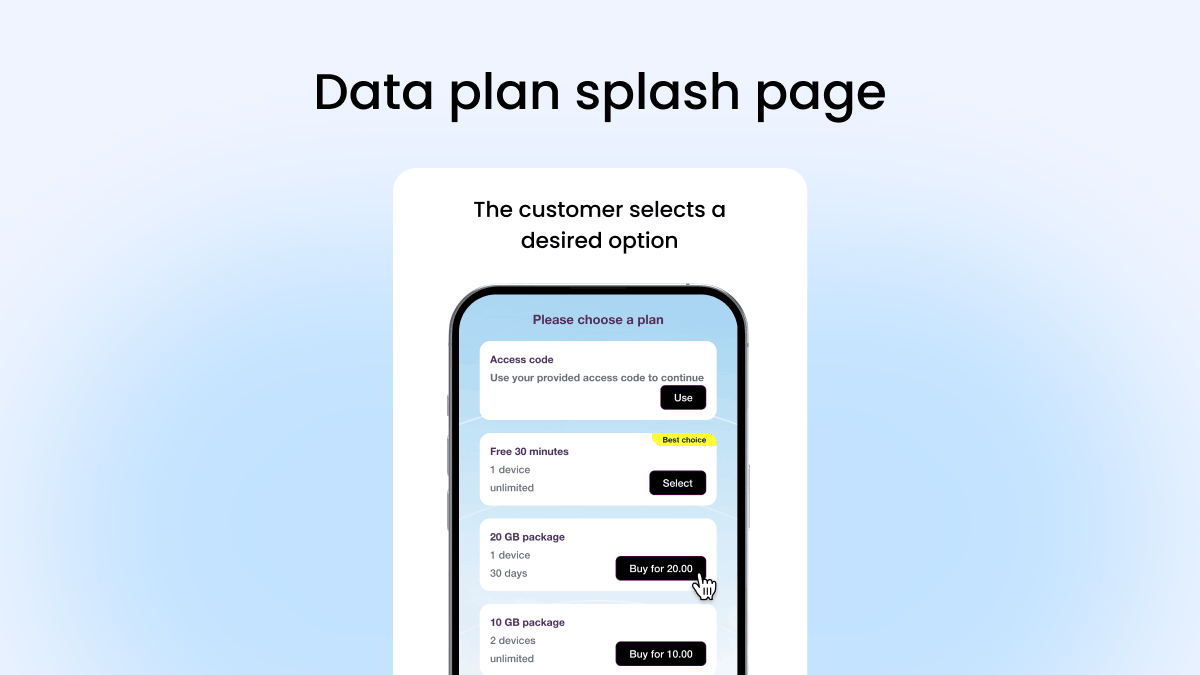
Powerlynx supports the building blocks for these setups. A location can show several plans on the same plan selection page, so a free plan can sit next to paid plans and an access code field for vouchers. The guest Wi-Fi page describes this directly: operators can offer paid Wi-Fi as the main access method or let customers upgrade to a paid plan for more data, higher speeds or longer access. The free plan’s usage limit (one time, or once per day, week or month) stops guests from repeating the free session indefinitely.
Because plans, splash pages, payment gateways and login options are set per location, one operator can run free Wi-Fi in some venues and paid Wi-Fi in others from the same account. Ads can be targeted at the free plan only, so free users see the ad while paying users go straight online. To separate user groups, a PIN-protected guest login limits that login option to people who receive the PIN, and access control rules can accept, hold or reject specific users.
How to choose the right Wi-Fi model for your business
Work through these questions before you set up plans:
- What is the main goal of the network: supporting another business, earning direct revenue, or both?
- Who uses the Wi-Fi: customers, visitors, residents, subscribers or event attendees?
- How often and for how long do they connect?
- Do users expect connectivity to be included in what they already pay for?
- Are they willing and able to pay directly, and with which payment methods?
- What does the network cost to run, including bandwidth and support?
- What traffic patterns do you expect, and where are the peaks?
- Does advertising or sponsorship make sense for your audience and partners?
- Do you need one model everywhere, or different models at different locations?
The tool below turns these questions into a starting recommendation.
As a rule of thumb by business type:
- Cafes, restaurants and hotels: start with free access, use plan limits to protect bandwidth, and consider a paid upgrade for heavy users;
- Shopping malls and retail: free access supported by advertising and marketing campaigns;
- ISPs, WISPs and public hotspot operators: paid plans and vouchers, with a short free plan if you want new users to try the service;
- Community networks in cash-based markets: vouchers sold through local resellers;
- Events: included access for attendees, or paid time and data plans when Wi-Fi is sold separately;
- Managed Wi-Fi providers: different models per client and location, depending on each venue’s goal.
Managing free and paid Wi-Fi with Powerlynx
Powerlynx is a Wi-Fi hotspot management platform that covers both models from one account. The same branded captive portal can offer free plans, paid plans and voucher access, and each location can have its own plans, splash pages, payment gateways and login options.
For free Wi-Fi, the relevant tools are free data plans with limits, guest data collection, access control and Wi-Fi advertising with target groups. Operators can also send SMS and email campaigns to target groups, immediately or on a schedule. For paid Wi-Fi, the core is paid data plans, integrated payment gateways, voucher batches and the Reseller Portal. A self-service customer portal lets users check their usage, manage devices and vouchers, and buy additional vouchers.
Licensing is based on the number of concurrent online users, with all features included in every plan and no limit on access points or locations. The pricing page has the details, and the Wi-Fi software pricing models comparison explains how this model differs from per AP and per location pricing.
Conclusion
Free and paid Wi-Fi solve different problems. Free access works when connectivity supports a business that earns money elsewhere, or when advertising and sponsors can cover the cost. Paid access works when connectivity is the product and users are ready to pay for it. Many networks end up with a mix: free access with limits, paid upgrades, and different rules for different locations. The right choice depends on your business objective, your audience, your locations and the economics of your network.
Whether you offer free connectivity, sell prepaid Wi-Fi access, or combine both approaches, the right management platform helps you control how guests connect and how your network runs. Explore Powerlynx guest Wi-Fi and paid Wi-Fi vouchers to see how they can support your model.