Powerlynx has supported SMS communication for a while, sending messages to customer groups, confirming phone numbers, and reaching people directly from their profile. Email is now available as a second channel alongside it.
The two aren’t interchangeable. SMS is immediate and short. Email is better suited for longer messages, HTML formatting, reusable templates, and situations where delivery confirmation of the address itself matters. Having both available means operators can choose the right format for what they’re trying to communicate.
See email in Powerlynx
Watch this short overview to see how Email works in Powerlynx – from individual customer messages and reusable templates to targeted campaigns and address verification.
What email in Powerlynx does
All email in Powerlynx goes through a mailbox you own. You connect either an SMTP server or a Gmail or Google Workspace account, and all outgoing messages use that mailbox. From there, three types of communication are available.
Individual emails go directly from a customer’s profile. Open any customer, go to their Communication tab, compose a message or load a template, and send. The full exchange is logged on that customer’s record.
Bulk campaigns go to a selected Target Group – a segment of customers defined by filters on your customer data. A campaign can go out immediately or be scheduled for a specific date and time. Recipients are confirmed at send time, so customers who join the target group after you schedule a campaign are included automatically.
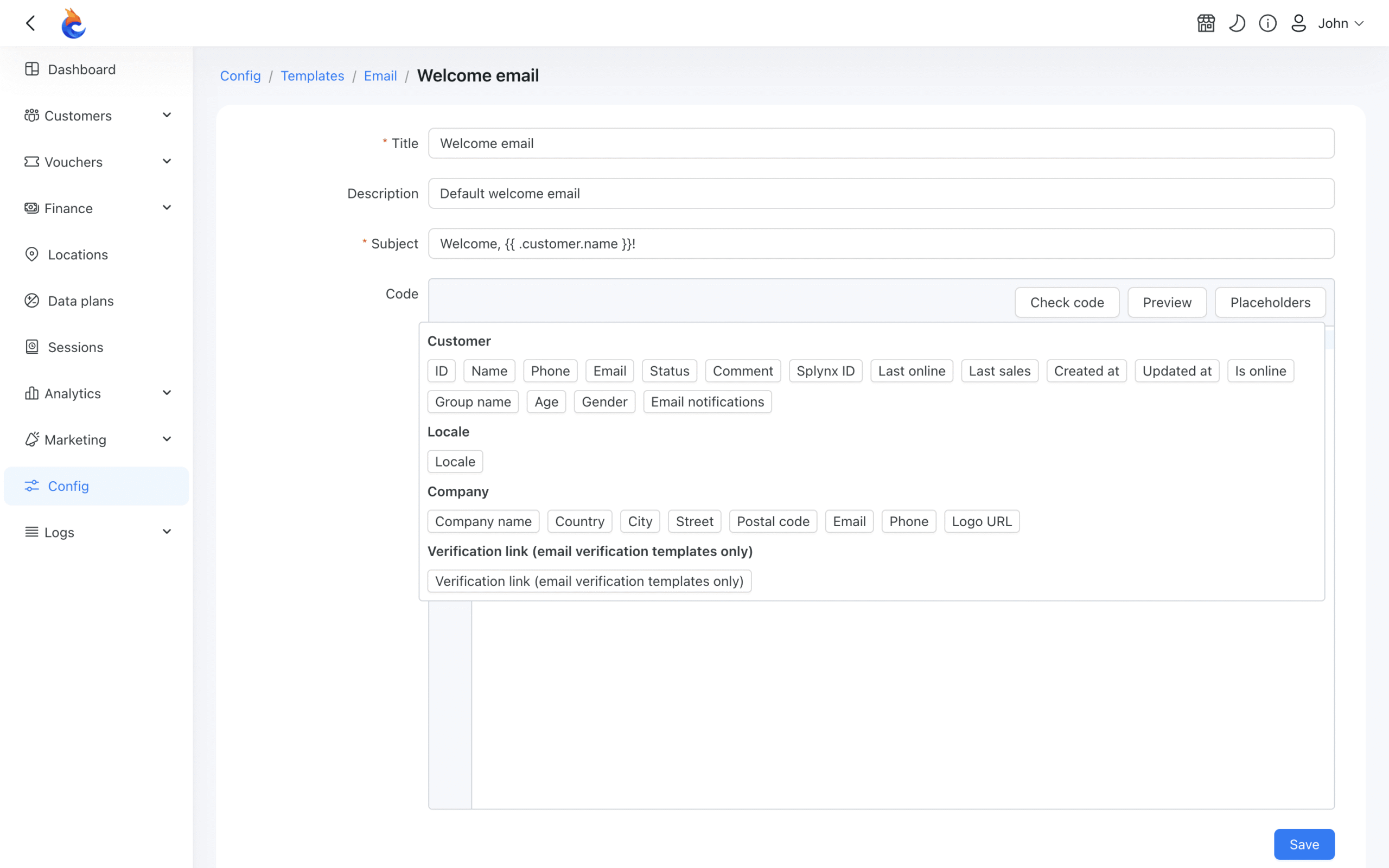
Templates store a subject line and an HTML body that can be reused across individual messages and campaigns. Placeholders pull in data from the customer’s profile, personalizing each message with the recipient’s name or other stored details.
Email address verification
Powerlynx includes two levels of email verification, both configurable and both off by default.
Automatic verification checks that an address is properly formatted and that its domain can accept mail. It doesn’t confirm that the person who registered actually owns the address.
Customer-confirmed verification goes further: Powerlynx sends a one-time link to the address the customer provided. Clicking it marks the address as customer-verified, the highest confidence level. You can trigger this on new customer registrations, on address changes, or both, and set how long the link stays valid.
Verification status is visible on each customer’s profile and can be used as a filter in Target Groups, so a campaign can be targeted to confirmed addresses only, rather than sending to everyone who provided something in the email field.
Every sent email is logged with recipient, subject, status, and timestamp. Failed messages include a reason, which makes it easier to diagnose mail server issues or identify addresses that aren’t reachable. A Sent status means your mail server accepted the message and passed it on – what happens after that isn’t tracked in Powerlynx.
What operators are using it for
Verifying addresses at registration
An operator who has collected email addresses over time may not know how reliable those addresses are. Turning on customer-confirmed verification for new registrations adds a one-time confirmation step: the customer receives a link, clicks it, and their address is marked verified. Over time, this builds a list of confirmed addresses that can be targeted separately from the full customer base.
Individual customer communication
Some messages belong to one person, not a group. An ISP following up on a reported connectivity issue, a hotel responding to a guest request, or an operator sending account-specific information can do all of this directly from the customer’s profile in Powerlynx, with the full exchange logged there.
Campaigns to a selected audience
A cafe can send a weekday promotion to customers who connected in the past two months. A hotel can share a returning-guest offer with past visitors. An ISP can notify a subset of customers about a service change relevant to their location. In each case, the audience is a Target Group (a segment defined by filters on customer data) rather than a manually compiled list.
Scheduled communication
A campaign doesn’t have to go out the moment it’s created. An operator can prepare a message in advance and set it to send on a specific date and time – useful for seasonal promotions, event reminders, or anything timed to a date that matters to the audience.
Email alongside SMS and Wi-Fi Advertising
Email, SMS, and Wi-Fi Advertising each reach customers at different moments, in different ways. Wi-Fi Advertising appears during the captive portal connection, while the person is on-site and the screen shows nothing else. SMS is direct, short, and well-suited for time-sensitive messages. Email handles longer content, branded layouts, and communication where there’s more to say.
Target Groups connect all three. A segment defined once in Powerlynx can be used for a Wi-Fi ad campaign, an email, and an SMS without rebuilding the audience each time. The group updates automatically as customers match or stop matching the criteria.
A hotel running a seasonal offer might show it during the Wi-Fi login experience, send a more detailed email to past guests who have confirmed addresses, and follow up via SMS for customers who provided a phone number and consented to receive messages. Each channel is configured and sent separately. The common thread is the audience, which is defined once.
More on Wi-Fi Advertising is at powerlynx.app/wifi-advertising. Documentation for Mass SMS and Target Groups is in the Powerlynx knowledge base at docs.powerlynx.app.
Email expands what operators can do with customer communication in Powerlynx. Individual messages, bulk campaigns with scheduling, reusable templates, and address verification are all available from the same platform used to manage the network.
Full documentation is at docs.powerlynx.app/system/email.html.