
We keep expanding the Powerlynx integration ecosystem to give operators more tools to act on the customer data their Wi-Fi networks collect. And now we’re adding a direct CRM connection: HubSpot.
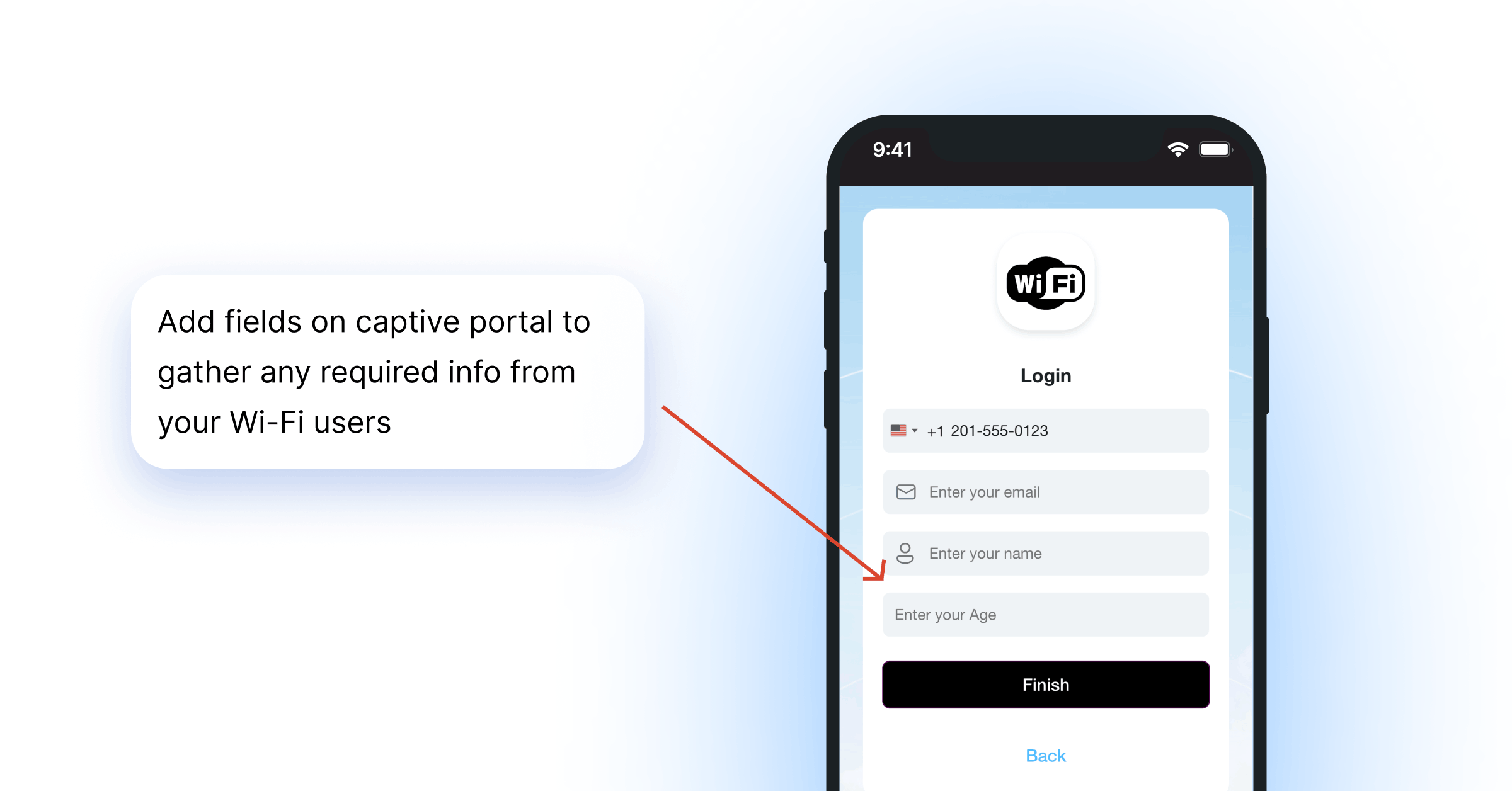
Every time a customer logs into your hotspot through the splash page, Powerlynx captures their details — name, email, phone, and any custom fields you’ve added. The HubSpot integration lets you push all of that directly into your HubSpot CRM as marketing contacts, ready for follow-up campaigns, segmentation, and automation.
Key Takeaways:
- Powerlynx now syncs Wi-Fi guest data one-way into HubSpot as CRM contacts.
- Email is the mandatory sync field; all other splash page fields are configurable via field mapping.
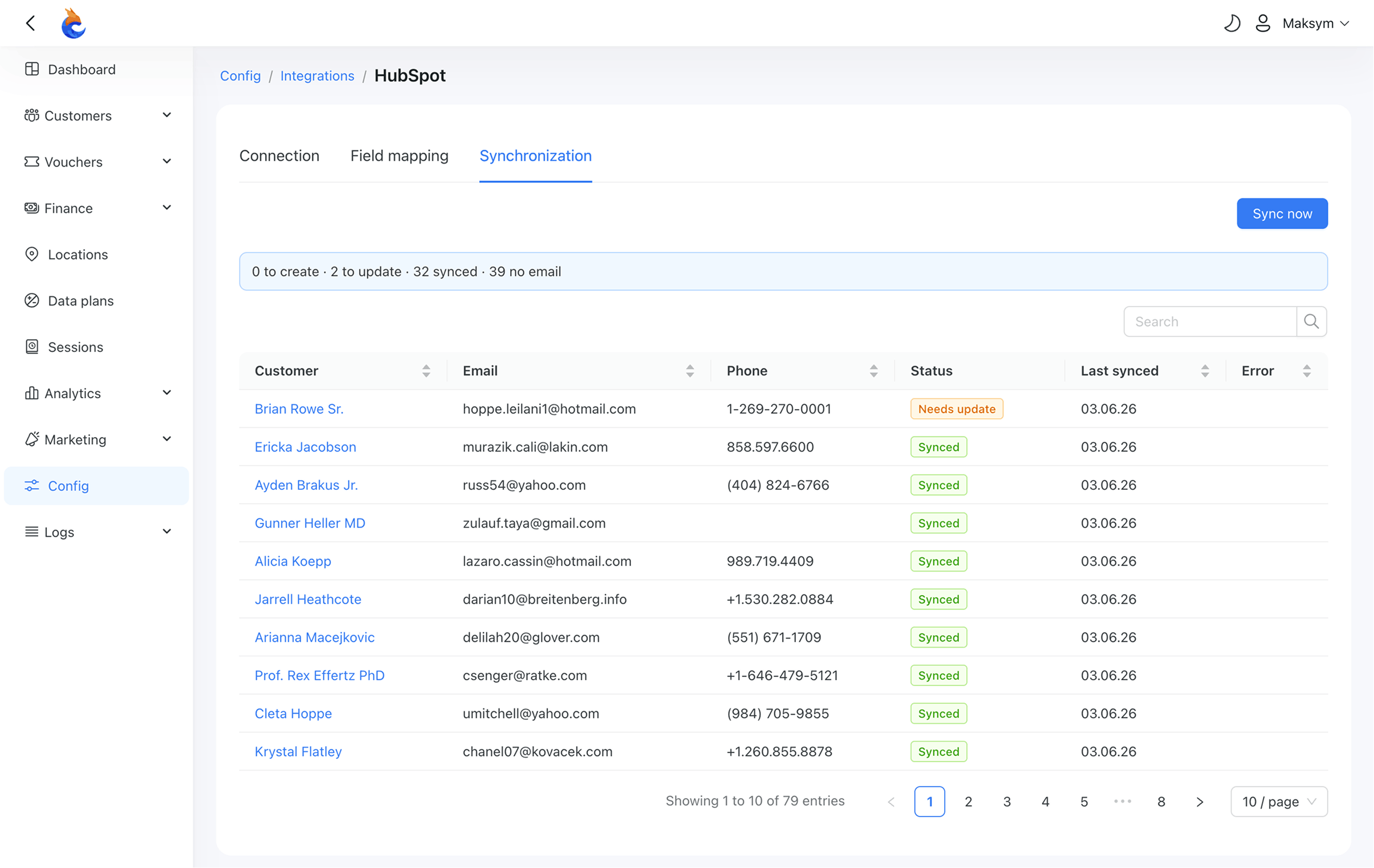
- A live sync dashboard shows exactly which contacts are synced, need updating, or can’t sync — before you push anything.
What Is HubSpot?
HubSpot is a CRM and marketing automation platform used for contact management, email campaigns, lead nurturing, and customer segmentation. For Wi-Fi hotspot operators, it’s the platform where your splash page leads become actionable CRM contacts — people you can reach with a post-visit offer, a loyalty campaign, or a renewal reminder.
How the Powerlynx-HubSpot Integration Works
The integration is a one-way sync from Powerlynx into HubSpot. Powerlynx stays the authoritative source of your Wi-Fi customer records; HubSpot receives a clean copy of the contacts you choose to push.
Sync is on-demand — you trigger it manually via the Sync now button when you’re ready. There’s no silent background process moving data without your knowledge.
The integration lives at Config → Integrations → HubSpot and is organised across three tabs:
- Connection — paste your HubSpot Service Key and save. Powerlynx validates the token and shows live connection status.
- Field Mapping — map your Powerlynx fields (built-in and custom) to HubSpot contact properties. Powerlynx loads your live HubSpot properties and pre-suggests defaults: email → email, phone → phone, name → first name. Email mapping is permanent and cannot be changed, it’s how HubSpot uniquely identifies each contact.
- Synchronisation — run the sync and monitor results.
Sync Status at a Glance
Before you push anything, the dashboard shows a full summary of what’s about to happen:
- To be created — new contacts HubSpot hasn’t seen yet
- To be updated — contacts whose data changed since the last sync
- Already synced — contacts that are current in both systems
- Unable to sync — contacts missing an email address
After syncing, each contact carries a status so you know exactly what happened: Synced, Needs update, Outdated, Error, Duplicate, or No email. Duplicates are handled safely — if the same email already exists in HubSpot under a different record, Powerlynx flags it rather than overwriting the existing contact.
What You Can Do With Your Wi-Fi Contacts in HubSpot
Getting contacts into HubSpot is just the first step. Once your Wi-Fi customers are there as marketing contacts, which is exactly what the Powerlynx integration creates, HubSpot’s full marketing stack opens up:
- Email campaigns. Send post-visit offers, loyalty rewards, plan upgrade nudges, or seasonal promotions directly to the people who already connected to your hotspot. These are warm contacts, because they’ve used your network.
- Segmented contact lists. Because Powerlynx maps any splash page field to a HubSpot contact property, you can build lists filtered by location, visit type, plan, or any custom data you collect — and target each segment with a different message.
- Ad audiences. HubSpot connects to Google Ads, Facebook Ads, and LinkedIn Ads. Your synced Wi-Fi contact lists become ad audiences for retargeting, so you can reach the same customers across social and search after they leave your venue.
- Automation workflows. Trigger automated sequences the moment a new Wi-Fi contact lands in HubSpot — a welcome email, a follow-up offer after 7 days, or an upsell flow for customers who connected more than three times.
More Monetization for HubSpot Users
If you already use HubSpot as your CRM, the Powerlynx integration turns every Wi-Fi login into a qualified lead — automatically added to your contact database with the data you defined on the splash page.
The key is the field mapping. Powerlynx lets you collect any data point on the splash page — name, email, phone, company, visit reason, or any custom field you create. Every field maps directly to a HubSpot contact property. That means from the moment a customer connects to your hotspot — you’re building a segmented, actionable contact list in your CRM.
For operators running multiple venues, this compounds: each location’s Wi-Fi users flow into the same HubSpot account, where you can segment by location and run location-specific campaigns without any manual sorting.
The integration sits alongside the full Powerlynx marketing toolkit — combine it with the built-in Wi-Fi advertising module, Target Groups segmentation, and Stripe, PayFast and other payment gateways for a complete guest Wi-Fi monetisation stack: collect the lead at login, charge for access, and re-engage via HubSpot.
Looking to build a full revenue model around your hotspots? See the paid Wi-Fi voucher business playbook for a practical walkthrough.
How to Connect Powerlynx to HubSpot
- In your HubSpot account, go to Development → Keys → Service keys → Create and generate a Service Key with crm.objects.contacts.read and crm.objects.contacts.write scopes.
- In Powerlynx, open Config → Integrations → HubSpot and paste the token into the Access token field. Save — Powerlynx validates the connection instantly.
- Map your splash page fields to HubSpot contact properties on the Field Mapping tab.
- Open the Synchronisation tab, review the sync summary, and click Sync now.
For the full setup walkthrough, follow the step-by-step integration guide in the Powerlynx documentation.
Not on Powerlynx yet? The HubSpot integration (like every feature) is included in the 21-day free trial with no credit card required. See the pricing page for the full plan details.